
Communication Tools
There are several communication tools available in Blackboard Learn Ultra. Communication Tools within an Ultra Module are:
Announcements
Your instructors can use announcements to share important time-sensitive information such as:
- Due dates for assignments and projects
- Changes to your syllabus
- Corrections/clarifications of materials
- Exam schedules
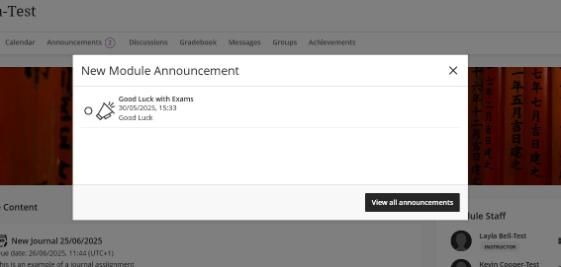
New Announcement view within a module
New module announcements reach you the next time you enter the module. You need to acknowledge the new announcement before you can access module content. After you acknowledge the announcement, it won’t show again.
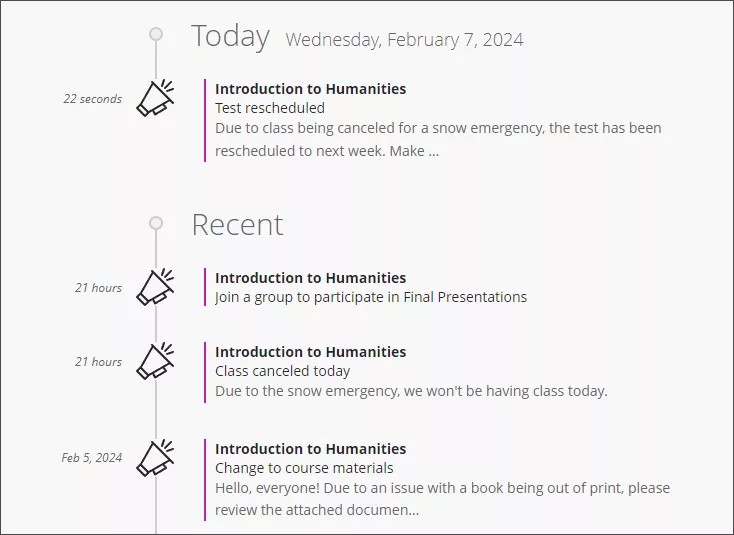
Announcements on the Activity page
You will also receive announcements on the Activity page. Announcements appear in the Today and Recent sections of the activity page. Most announcements disappear from the Activity page when you view them within their modules.
Messages
You can send messages to your instructors, other classmates, and group members. Your module instructors set module-level controls for messages to restrict what you can do, or you can turn off messages completely.
Where can I access all my messages?
From within the module, you can click on Messages in the top navigation to access all messages.
Messages for all modules you are enrolled in are available when you click on Messages on the left navigation. As an instructor, you can quickly send messages to all students about important deadlines and schedule changes.
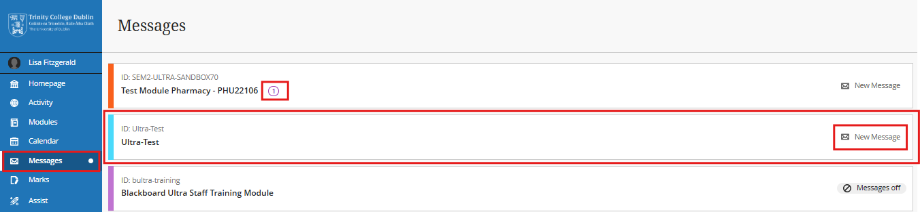
- Unread messages are indicated with a number within a red circle and appear first.
- Jump into your messages. Select a module card to view all new and existing messages in your module. You can delete messages inside your module.
- Select New Message beside your module ID to send a message to one or multiple people, a group, or a class. Begin typing, and recipient names pop up.
You will also receive message notifications by email immediately or in your daily email from Blackboard (depending on your notification settings).
Journals
Journals are a private space between you and the module instructor. Within Journals, you can share thoughts and ideas about module materials. You can also use journals as a self-reflective tool. Your instructor can reply to your journal entries with comments and feedback. Other students cannot see the entries you make in a module journal.